
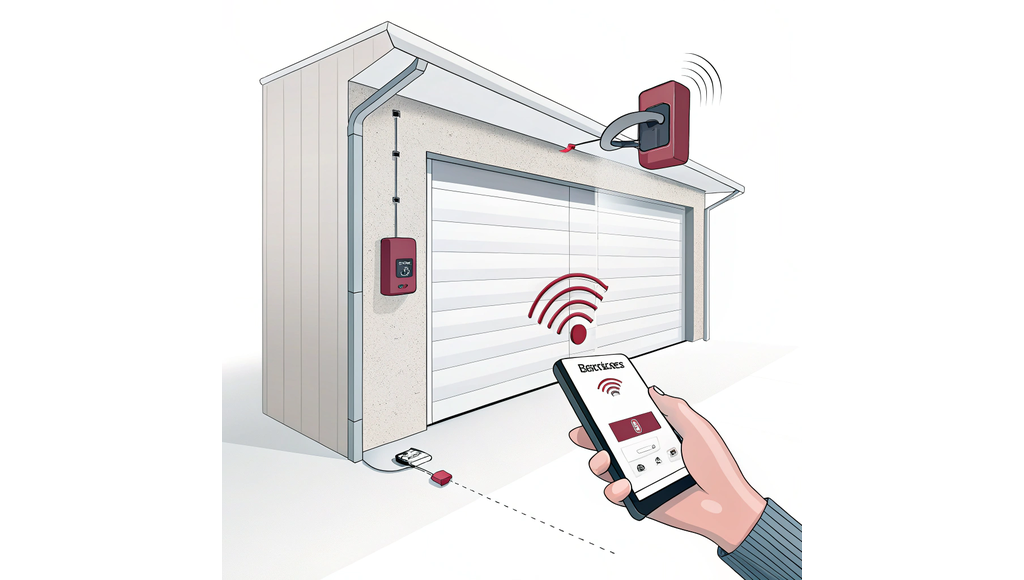
Installing a smart garage door opener gives you smartphone control, activity notifications, and the ability to check if you left the door open from anywhere. The good news? You can probably install one yourself in 45 to 90 minutes if your garage door opener was made after 1993. This guide walks you through checking compatibility, gathering the right tools, completing the installation, and fixing common problems that trip up first-time installers.
Most smart garage door devices cost between $30 and $100, and professional installation adds another $150 to $400 in labor charges. Doing it yourself means you pocket those savings while gaining hands-on knowledge of how your system works. As the Garage Door Repair Guide explains, understanding your opener system helps you troubleshoot issues and maintain your door properly.
Safety Note: Smart opener installation is safe for DIYers because it doesn't involve dangerous spring tension. However, if your opener needs repairs before adding smart features, call a professional for spring or cable work.
Checking compatibility before you buy
Your garage door opener needs three things to work with smart controllers. First, it must have been manufactured after 1993, when safety sensors became mandatory. Second, you need a "Learn" button on your opener motor (usually purple or yellow). Third, your Wi-Fi signal needs to reach your garage at 2.4GHz frequency.
Walk out to your garage and look at the motor unit hanging from the ceiling. Find the light cover or side panel and check for a colored button labeled "Learn" or "Smart." Most Chamberlain, LiftMaster, Genie, and Overhead Door openers from the past 20 years have this button. If you see safety sensors mounted near the floor on each side of your door, that confirms your opener is new enough.
Test your Wi-Fi signal strength by standing next to your opener with your smartphone. Open your Wi-Fi settings and check the signal bars. You need at least three bars for reliable connection. If your signal is weak, you'll need a Wi-Fi extender before installing the smart controller. For more details on how safety sensors work, check out our garage door sensor alignment guide.
| Compatibility Factor | What to Check | Required Standard |
|---|---|---|
| Opener age | Manufacturing date | 1993 or newer |
| Safety sensors | Two units near floor | Must be present |
| Learn button | Color-coded button | Purple or yellow |
| Wi-Fi frequency | Router settings | 2.4GHz band |
| Signal strength | Phone test at opener | 3+ bars minimum |
Tools and preparation steps
You'll need basic household tools for this installation. Grab a screwdriver or power drill, a ladder rated for at least 250 pounds, a hammer for tapping ceiling anchors, and your smartphone with the manufacturer's app already downloaded. Most installations require mounting hardware that comes in the box, including screws, anchors, and adhesive strips.
Before you start, unplug your garage door opener from its power outlet. This prevents the door from moving unexpectedly while you're working on it. Clean the top panel of your garage door where the sensor will mount, removing any dust, oil, or debris. Dirty surfaces prevent adhesive from sticking properly, causing sensor failures later.
Download the control app (myQ, iSmartGate, or your manufacturer's app) while you're still inside with good Wi-Fi. Create your account and review the setup process before heading to the garage. This preparation cuts your installation time by 15 to 20 minutes and prevents frustrating trips back inside to download files or reset passwords.
Time Saver: Clear at least five feet around your opener motor before starting. Moving stored items now prevents awkward reaches from your ladder and reduces the chance of knocking things over mid-installation.
Installation process step by step
Start by attaching the tilt sensor to the top panel of your garage door. The mounting plate sticks on with heavy-duty adhesive tape or small screws. Make sure the arrows on the sensor point up toward the ceiling, then snap the sensor unit onto the plate. Pull the battery tab to activate it.
Next, mount the smart hub near your opener motor. You have two options. Ceiling mounting uses four screws with anchors, placing the hub close to your opener and a power outlet. Bracket mounting attaches the hub directly to your opener's metal housing with adjustable brackets. Position the hub where it won't interfere with the moving door or obstruct warning lights.
Connect the hub's control wires to your opener's push-button terminals. These are usually labeled "PWC" or marked with red and white indicators. Match white wire to white terminal and black to black. Secure the hub's power supply in an outlet bracket or plug directly into a nearby outlet, then restore power to your opener.
Open the app on your phone and follow the pairing sequence. Create or log into your account, select "Add Device," and connect the hub to your Wi-Fi network. The hub light will blink blue during setup and turn solid green when connected. Press the "Learn" button on your opener motor, then assign a name to your door like "Main Garage" or "Workshop Door."
Test the installation by opening and closing your door through the app. The hub should beep for five seconds before the door moves, giving you warning time. Check that the tilt sensor accurately reports whether your door is open or closed. If the status seems wrong, troubleshoot your opener or reposition the sensor. For detailed cost breakdowns on different smart opener models, see our smart opener cost comparison.
Common problems and solutions
Weak Wi-Fi causes 30% of failed smart opener installations. Your hub light blinks blue indefinitely instead of turning green. The fix involves moving your router closer, adding a Wi-Fi extender, or switching to a 2.4GHz network if your phone defaulted to 5GHz during setup. Check your router settings to confirm the 2.4GHz band is active.
Sensor misalignment makes your door status inaccurate in the app. The door shows "open" when it's actually closed, or vice versa. This happens when the sensor arrows don't point straight up or when adhesive fails on dusty surfaces. Remove the sensor, clean both surfaces with rubbing alcohol, and remount with fresh adhesive or screws. The arrows must point toward the ceiling.
Wiring errors prevent the hub from controlling your door. You see no response when you press the app button, or your wall button stops working. Double-check that wires connect to the correct terminals on your opener. White matches white, black matches black. Make sure wires don't contact moving parts or get pinched by the hub's mounting bracket.
Tall doors over eight feet may need extension kits for the sensor to work properly. The tilt detection range has limits, and very tall doors exceed that range. Contact your smart opener manufacturer for extension kits that cost $20 to $40. If you've checked all these issues and still have problems, professional help ensures correct installation without damaging your equipment.
Pro Tip: GarageDoorHandbook connects you with local professionals who install smart openers as part of their regular service. If you'd rather skip the DIY route or run into problems you can't solve, request quotes from vetted contractors in your area for same-day installation.
Installing a smart garage door opener yourself saves $150 to $400 in professional labor while adding convenient smartphone control to your existing system. Most people complete the installation in 45 to 90 minutes by following the compatibility checks, gathering proper tools, and working through the step-by-step process. Your biggest keys to success are confirming compatibility before you buy, ensuring strong Wi-Fi signal in your garage, and carefully mounting the sensor with arrows pointing up.
Test your smart opener monthly to confirm notifications work correctly and the app accurately shows door status. Add garage door checks to your maintenance schedule alongside lubrication and safety testing. When you need professional help with repairs or upgrades, GarageDoorHandbook's directory of top-rated local contractors ensures you find reliable service at fair prices.
FAQs
Can I install a smart garage door opener on an old garage door?
You can install a smart opener on any garage door made after 1993 that has safety sensors and a Learn button on the motor unit. Check your opener for a purple or yellow Learn button and verify that safety sensors exist on both sides of the door near the floor. Openers older than 1993 typically lack the necessary wiring terminals for smart controller compatibility.
How long does it take to install a smart garage door opener?
Most DIY installations take 45 to 90 minutes from start to finish. Your actual time depends on Wi-Fi signal strength in your garage, how easily you can access your opener motor, and whether you need to mount the hub on the ceiling or attach it directly to your opener. Downloading the app and creating your account before starting saves about 15 to 20 minutes.
Why won't my smart garage door opener connect to Wi-Fi?
Most connection failures happen because smart openers require 2.4GHz Wi-Fi networks, not 5GHz. Check your router settings to confirm the 2.4GHz band is active and your phone isn't defaulting to 5GHz during setup. Weak signal strength also prevents connection, so test for at least three bars of Wi-Fi where your opener is mounted or add a Wi-Fi extender.
Do I need special tools to install a smart garage door opener?
You only need basic household tools for installation. Grab a screwdriver or power drill, a sturdy ladder, and your smartphone with the manufacturer's app downloaded. Most kits include all mounting hardware like screws, anchors, and adhesive strips. The installation doesn't require electrical experience since you're just connecting wires to existing terminals on your opener motor.